
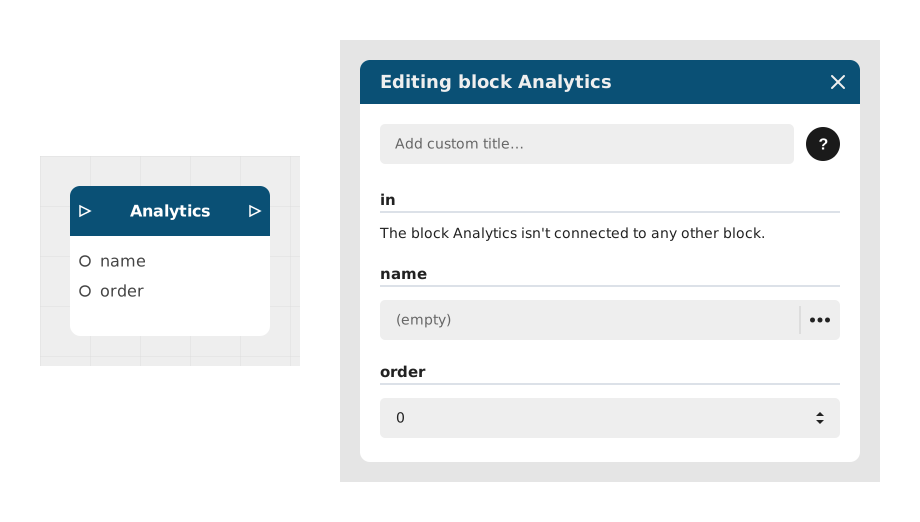
The Analytics block allows you to record an invisible event in Celestory statistics to track user behavior. It acts as a discreet marker that helps analyze journeys, identify drop-off points or measure engagement.
This block is particularly useful for tracking a "conversion funnel" (the successive steps of a journey, for example: view a product → add it to the cart → buy it, watching how many people move from one step to the next), validating the effectiveness of a user journey or simply counting specific actions without impacting the experience.
📥 Entries
- in (Flow): Entry point triggering the recording of the analytics event.
- name (Text): Explicit name of the event to measure (eg: Bouton_Purchase_Click, Level_3_Successful). This name will appear in statistical dashboards.
- order (Number, optional): Number defining the expected order of events to facilitate their sorting or the visualization of a funnel (eg: 1 for the start, 2 for the end). Default value: 0.
📤 Outings
- out (Flow): Activates instantly after discreetly sending the statistical data, without impact on the user flow.
💡 Example of use
Scenario: Conversion tracking in a purchasing journey
- The user arrives on a product page in an e-commerce experience.
- An Analytics block is placed with name = "Page_Produit_View" and order = 1.
- The user clicks on the “Add to cart” button.
- A second Analytics block is triggered with name = "Add_Basket" and order = 2.
- Data is automatically recorded in Celestory, allowing analysis of the conversion rate between product view and add to cart.
⚙️ Technical Details
- Technical behavior: The block sends an asynchronous request to the Celestory servers without blocking the user flow. Data is processed in real time and available in dashboards within 5 to 10 minutes.
- Variable management: The name field accepts dynamic variables (e.g. Niveau_${level}_Passed), but avoid special characters or spaces.
- Limit: The same event with the same name and order will be aggregated in the statistics. For unique events, use distinct names.
Documented version: v1