
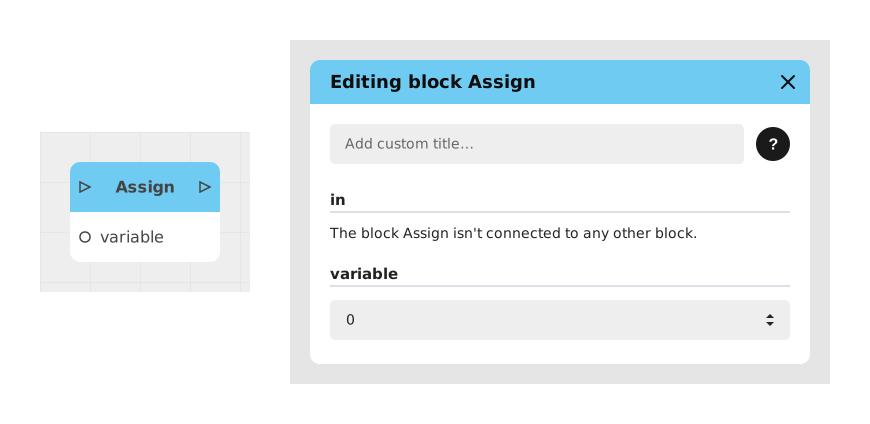
The Assignment block allows you to modify the value of a variable during an experiment. It is essential for dynamically updating data like a score, counter or any other information stored in a variable.
This block completely replaces the previous value of the variable with the new value provided, which distinguishes it from other blocks like Increment which modify an existing value without overwriting it.
📥 Inputs
- in (Flux): Block trigger. When the flow reaches this point, the target variable is updated.
- variable (Variable): Variable to modify (can be of type Text, Number, Boolean, Image, List, File, Object, Date, Single select, Multiple select, etc.). When the variable is chosen in the editing window and nothing is wired to
variableorvalue, the block is drawn compact as « variable = value » with onlyinandout: the variable and the value are then set in the editing window. - value (Dynamic type): New value which will replace the old one. The type automatically adapts to that of the selected variable. For a selection variable, the point offers the options of the variable: choose the one to keep. This point only appears once the variable is chosen.
📤 Outputs
- out (Flow): Activates immediately after modifying the variable, allowing the flow to continue.
💡 Example of use
Scenario: Updating a player's score after a success
- A player completes a challenge in an interactive game.
- The flow arrives at a Condition block checking if the challenge is successful.
- If the condition is true, the flow is redirected to an Assignment block.
- The Assignment block modifies the Score variable by assigning it the value 100.
- The flow continues to a Display block to inform the player of their new score.
⚙️ Technical Details
- Behavior of variables: The previous value of the variable is completely overwritten by the new value provided. For operations like increment, use the Increment block instead.
- Dynamic adaptation: The value field automatically adapts to the type of the selected variable (number, text, etc.).
- Selection variables: the block changes the selection of the variable (the received selection replaces the old one, the options of the variable are kept). See Selection variables (single and multiple). The Date, Single select and Multiple select types are available from Creator version 6.1.
Documented version: v2