
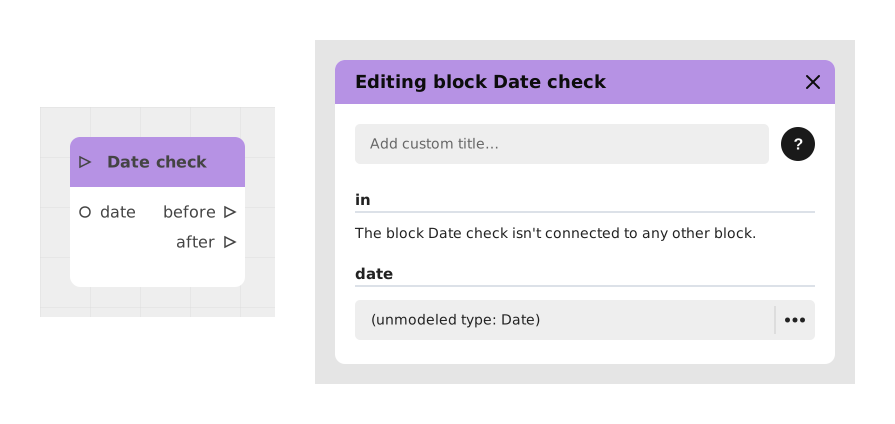
The Date Check block compares the current date and time of the player's device (read by the block itself, with nothing to connect for that) to a reference date you choose, to find out whether we are before or after that date.
This block is particularly useful for managing time constraints in interactive experiences, such as time-limited promotions, seasonal events or deadline validations.
📥 Inputs
- in (Stream): triggers the check.
- date (Date): reference date the current date and time will be compared to. Pick it directly in the block, or connect it to a Date variable or to the output of another date block (for example Add to a date).
📤 Outputs
- before (Stream): flow activated if the current date and time are before or equal to the reference date. The flow also takes this output if the reference date cannot be read.
- after (Stream): flow activated if the current date and time are strictly after the reference date.
💡 Example of use
Scenario: Validation of a promotional code before expiration
- A user enters a promotional code into your Celestory module.
- The flow triggers the Date check block, configured with the reference date December 31, 2024 at 11:59 PM in the date field.
- The block then compares this date to the current time of the player's device on its own, with nothing else to set up.
- If we are before that date, the flow takes the before output and applies the discount.
- If we are after, the flow takes the after output and displays a message: "Sorry, this promotion has expired."
⚙️ Technical Details
- Time source: the block reads the clock of the player's device. It no longer calls any online service: it therefore also works offline, and no longer depends on the availability of an external service.
- Time zone: the comparison is made between two precise instants, the reference date being stored in UTC. The result is therefore the same everywhere in the world at the same moment, whatever the player's time zone (a reference date picked in the editor is read in the time zone of your computer when you set it).
- Limit: the player can change the date and time of their device, and so change the result of the block. Do not use it as the only protection for content that must really stay locked until a given date.
- Error handling: if the reference date is empty or unreadable, the block takes the before output by default.
- Existing projects: blocks already placed keep working with no change.
🔗 See also
- Compare two dates: compare any two dates, with a precision of your choice (same day, same month...), and three outputs (before, same, after).
- Now: get the present instant as a date.
- Date variable: create and set a reference date.
Since Creator version 6.1, the block reads the clock of the player's device.
Documented version: v2