
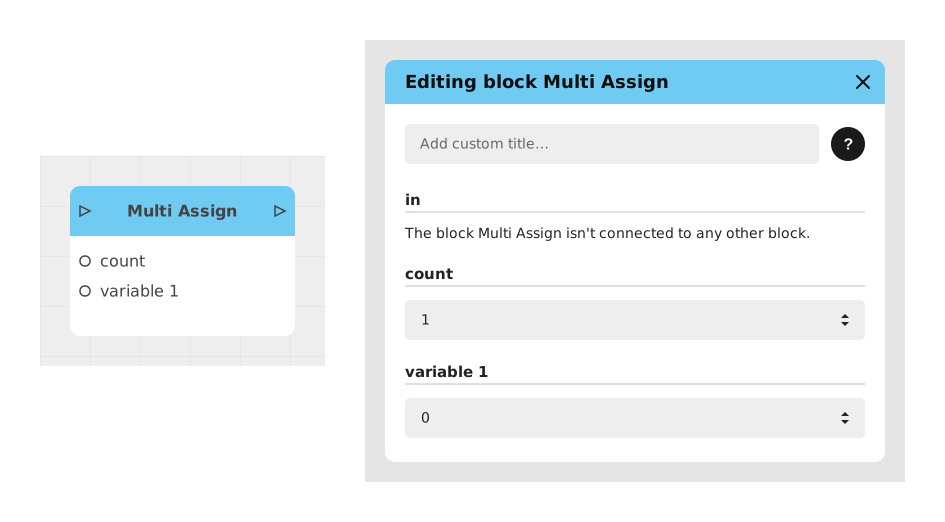
The Multi Assign block allows several variables to be modified simultaneously in a single block, thus avoiding the repeated use of individual assignment blocks. Ideal for resetting counters or updating multiple user data in a single operation.
📥 Inputs
- in (Signal): Triggers the assignment or modification of variables.
- count (Number): Defines the number of variables to modify. The block dynamically adjusts the number of variable/value pairs based on this value.
- variable (Variable): Target variable to modify (repeated as many times as specified by count). It can be of type Text, Number, Boolean, Image, List, File, Object, Date, Single select, Multiple select, etc.
- value (Any): New value to assign to the target variable (repeated as many times as specified by count). For a selection variable, the point offers the options of the variable.
📤 Outputs
- out (Signal): Activates once all variables have been successfully modified.
💡 Example of use
Scenario: Resetting a player's statistics at the start of the game
- The player presses the “New Game” button.
- The flow triggers a reset sequence.
- The Multi Assign block is configured with count = 3 to modify 3 variables.
- The variable/value pairs are connected:
- score → 0
- lives → 3
- level → 1
- The out signal activates the continuation of the flow (eg: display of the starting screen).
⚙️ Technical Details
-
Dynamic behavior: The number of variable/value pairs automatically adapts to the value of count. If count is changed, additional entries are added or removed.
-
Validation: All variables must be defined before execution to avoid errors. The block does not process uninitialized variables.
-
Selection variables: a Single select or Multiple select receives the provided selection (the options of the variable are kept). See Selection variables (single and multiple). The Date, Single select and Multiple select types are available from Creator version 6.1.
Documented version: v2