
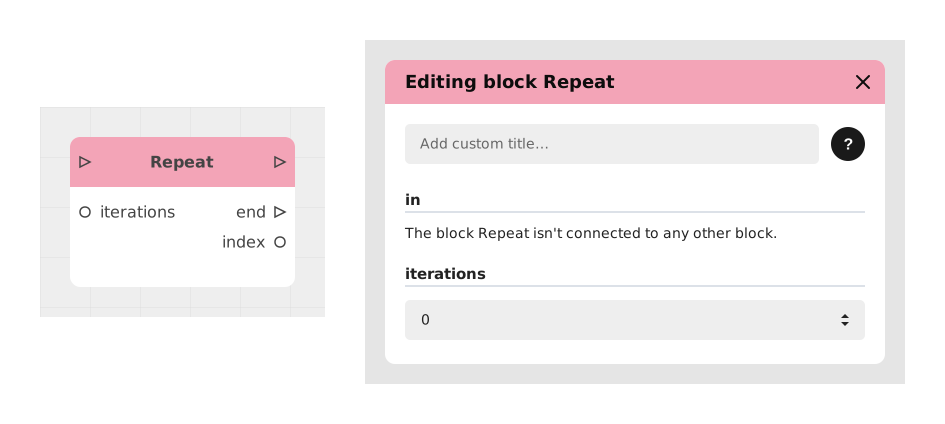
The Repeat block lets you repeat an action or a flow a set number of times, one after another (the equivalent of a "for" loop in programming).
It's especially useful for avoiding manual duplication of nodes in a graph — for example to generate visual elements, distribute objects, or make several network calls in a row.
📥 Entries
- iterations (Number): Integer defining the total number of loop executions. For example, a value of 3 will repeat the action three times.
📤 Outputs
- index (Number): Indicates the number of the current iteration (1, 2, 3, etc.). Useful for incremental operations or lists.
- out (Stream): Main flow of the loop. Everything connected to it runs on each iteration.
- end (Stream): Stream triggered once all iterations are completed. Allows the flow to continue after the loop.
💡 Example of use
Scenario: Generate a grid of squares for a board game
- A game needs a 4x4 grid of squares for a level.
- The Repeat block is set up with count at 16 (4x4).
- The loop output is connected to a block that creates a square, placing it at a position calculated from index (e.g. x = index % 4, y = index // 4).
- On each iteration, a new square is created and positioned automatically.
- Once the 16 iterations are done, the end output triggers a validation block to move on to the next stage of the game.
⚙️ Technical Details
- Variable handling: Outputs like index are updated asynchronously. If there are delays (API calls, heavy calculations), check that the data stays consistent.
- Special case: If count is set to 0, the loop flow never triggers and end fires immediately.
Documented version: v1